
 Free local tools · Metered online AI
BrushLLM Image Studio —Image editing and AI tools
Convert, compress, crop, watermark and edit EXIF locally for free. Online image generation, background removal and generative fill use the BrushLLM API and are billed by usage.
- Local image editing
- Online AI editing
- 9 languages
- Open source
macOS (Apple Silicon) · Windows 11 (x64 / ARM64)
BrushLLM Image Studio
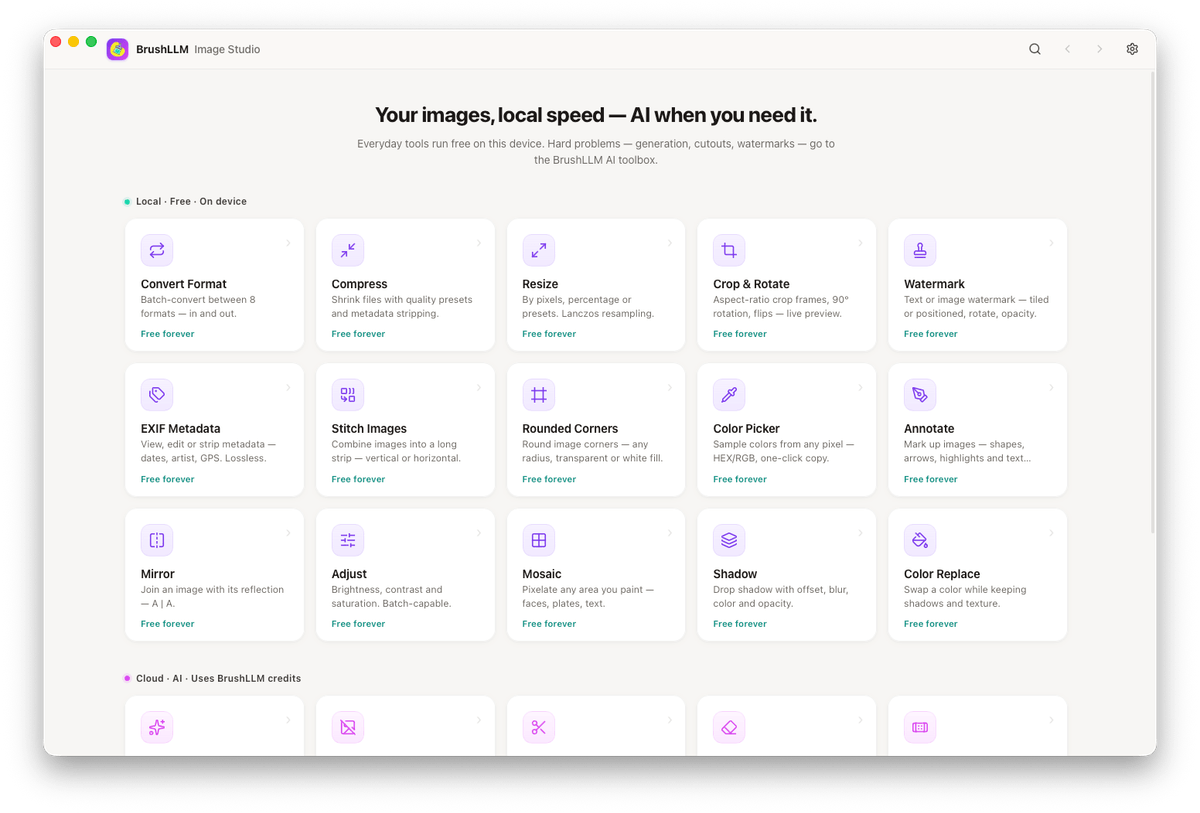
Local conversion, compression and cropping do not upload your files. Online AI features use the BrushLLM API and are billed by usage. See image model prices.
Local tools
Convert & compress
Convert formats including AVIF and WebP, with output quality and size controls.
Resize, crop & rotate
Adjust by pixel dimensions or aspect presets, with batch operations.
Watermarks & annotation
Text and image watermarks, arrows, boxes and freehand annotation for screenshots and docs.
EXIF view, edit & strip
Inspect full metadata, rewrite fields, or scrub location and camera data before sharing.
Stitch, mosaic & shadows
Combine images into grids, pixelate regions, add rounded corners and drop shadows.
Color tools
Brightness, contrast and saturation, color replacement, and a magnifying color picker.
Online AI tools
Generate images
Generate from text and pay by generated image.
Remove backgrounds
Submit an image and generate a background-removed result for product photos or other assets.
Remove objects & watermarks
Select a region to remove and let the image model fill it.
Generative fill
Expand, replace or swap content with optional reference images (e.g. person swap).
Restyle
Repaint an image from a prompt with a different visual style.
Keys and limits
Use a BrushLLM key, review usage and set spend limits in the console.
Source code and releases
View the source, report issues or download releases on GitHub. Local tools need no account; online AI features need an API key.
View image models and pricing